

Know Who’s On Your Website
98% of visitors never fill out a form. Lead ID tells you who they are in real time and sends the lead straight to your inbox — or into GeauxIQ if you’re using our platform. No guessing. Just leads you can act on.
Turn Anonymous Visitors Into Real Leads
Most website visitors never fill out a form — but that doesn’t mean you should miss out on them. Lead ID shows you exactly who is on your site in real time, giving you the insight you need to follow up.
Once we identify a lead, you get it instantly. We’ll email it straight to you, or, if you’re using our GeauxIQ platform, we’ll pass it directly into your workflows for immediate follow-up.
If you don’t use GeauxIQ, no problem — you’ll still receive leads by email or through your Lead ID dashboard.
With Lead ID, you’ll never wonder who’s on your site — you’ll know, and you’ll be ready to act.
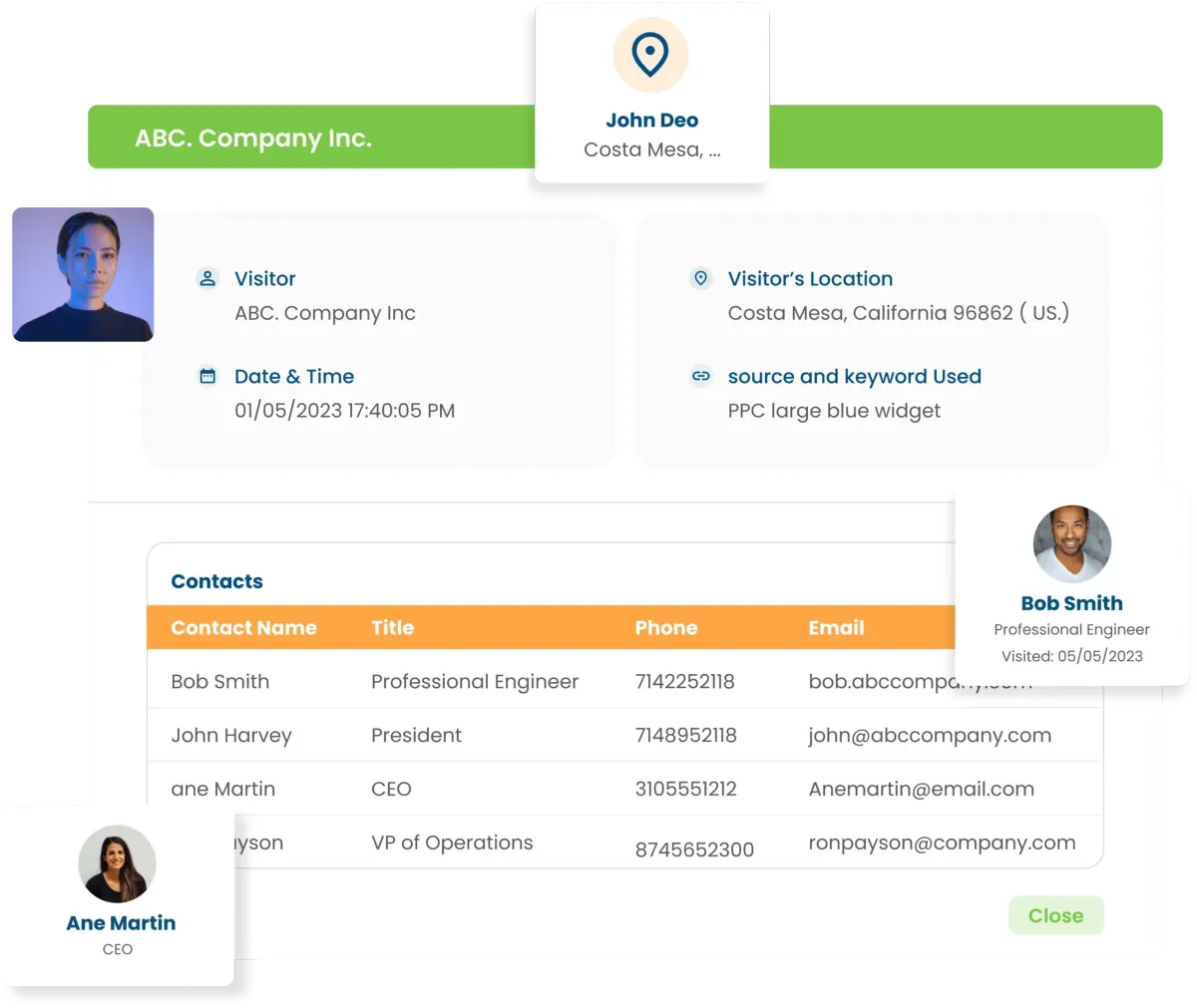
Turn Website Traffic Into Actionable Leads and Sales.
Maximize your website’s potential by turning anonymous visitors into revenue. Our platform tracks customer behavior—identifying who they are, what pages they visit, and how long they stay—then seamlessly integrates with your email marketing system, CRM, direct mail, and custom audience platforms. With this data, you can trigger automated emails, targeted direct mail, and personalized ad campaigns based on real buying behavior, keeping your brand top-of-mind until the moment of purchase. No more relying solely on generic Google Analytics reports—now you can see exactly who is engaging with your site and take action. By harnessing the power of first-party data, we help you convert more visitors into loyal customers, bringing clarity, confidence, and results to your digital marketing efforts.
Effortless Email List Growth—No Extra Effort Required
The Old Way: Growing your email list used to be time-consuming and costly. You had to drive traffic, optimize offers, and refine your Call-to-Action—only to capture a small fraction of your visitors.
The New Way: With LeadID, you can automatically identify and capture ~35% of your website visitors—along with their name, email, and browsing activity. This data is seamlessly added to your email list, enabling you to engage and convert more leads without any manual work.


Read Our Latest Updates

GeauxIQ Updates Week of January 16th
GeauxIQ Weekly Releases — More Control, Smarter AI, and Major Performance Gains
This week’s GeauxIQ updates delivered a powerful mix of new features, deeper AI capabilities, improved compliance tools, and meaningful performance upgrades—many of them behind the scenes, but all designed to make the platform faster, clearer, and more scalable.
Here’s what’s new and why it matters.
🔎 SEO: More Accurate Business Search Options
Local SEO tools now support:
Business name
Google Place ID
Google Maps business URL
Why it matters:
This makes it easier to target the correct business when running audits, reports, or optimizations—especially in crowded local markets.
💬 Conversations: Group SMS Attachments
Group SMS conversations now support images and file attachments.
Why it matters:
Perfect for industries like real estate or project-based businesses where multiple stakeholders need to stay aligned in one thread.
🚫 DND Transparency: Clearer Status Tracking
Do Not Disturb (DND) status now clearly shows how it was applied:
User action
Customer action
Workflow automation
Why it matters:
Troubleshooting messaging issues is faster and far less confusing.
🧩 App Marketplace: Version Control & In-Place Updates
The App Marketplace now supports:
Explicit versioning
In-place updates
Better auto-update controls
Why it matters:
Developers gain greater control over app releases, stability, and rollout timing.
⚙️ Workflows: Smarter Automation Enhancements
Workflow AI Builder Autosave
Autosave now works inside the Workflow AI Builder.
Why it matters:
No more losing progress while building complex automations.
Enhanced Opportunity Change Triggers
Workflows can now trigger when an opportunity changes to a specific status, not just “any change.”
Why it matters:
This enables more precise, efficient automation with fewer filters.
🤖 Agent Studio: Triggers Are Here
Agent Studio now supports native triggers, including:
Tag changes
CRM events
API-based triggers
Why it matters:
Advanced AI agents can now react to real business events—without relying on custom API logic.
A future connection to the chat widget will allow Agent Studio workflows to power live conversations directly.
📞 Voice AI: Expanded Consent Controls
Outbound AI calling now includes:
Consent capture from forms, surveys, chat widgets, and lead ads
Automated consent audits
Scan-and-fix language detection
Why it matters:
This ensures compliance while protecting your brand and your clients’ reputations.
🖼️ Media Library: Better Image Editing
Media cropping inside the Media Library now:
Preserves PNG transparency
Fixes compression issues
Eliminates the need for external editors
Why it matters:
Faster workflows, cleaner assets, fewer duplicates.
⚡ Performance Improvements (Big Wins)
This week included major backend optimizations:
Chat widget latency improved up to 6.2× faster
Overall app responsiveness noticeably improved
Why it matters:
Everything feels faster—and that compounds across daily workflows.
🧠 Support AI & Workflow AI Improvements
Support AI now preserves more context for better ticket resolution
Workflow AI Assistant is smarter about when to search knowledge bases vs. respond naturally
Why it matters:
More accurate answers, faster resolutions, fewer hallucinations.
🔐 Security & Developer Platform Upgrades
New MCP platform architecture
Improved testing, stability, and integrations (including OpenAI connections)
Multiple new security enhancements
Why it matters:
Higher-quality integrations and stronger platform reliability—without added complexity.
🧪 Labs Updates: UI & Messaging Improvements
Rich Media Messaging (WhatsApp)
Send media from Media Storage
Add captions to rich media messages
New Contacts & Conversations UI
Improved contrast
Larger buttons
Faster backend performance
Why it matters:
Cleaner interfaces paired with significantly faster performance.
Written by Brandon Foreman
Geaux Grow | Family Resource Group Inc.
Powered by GeauxIQ


